
Why Is My Phone Not Charging?
Quick Summary
You plug in your phone, but… nothing happens. No buzz, no lightning bolt, no charging bar. Before you panic, take a deep breath—this guide will walk you through simple reasons your phone might not be charging (and easy fixes you can do yourself).
Imagine This Scenario
It’s bedtime. You plug in your phone, set it on the nightstand, and drift off.
The next morning—surprise!—the battery’s at 3% and your alarm didn’t go off.
We’ve all been there. Sometimes the problem isn’t the phone—it’s a loose cord, dusty port, or tired charger. Here’s how to troubleshoot step by step, without fancy tools or tech talk.

1. Check the Basics First
Summary: Sometimes it’s the small stuff.
Make sure the charger is fully plugged in on both ends—wall and phone.
Try a different outlet (some may be controlled by light switches).
If you’re using a power strip, make sure it’s on.
💡 Tip: Plug in another device—like a lamp—to confirm the outlet works.
2. Inspect Your Charging Cable
Summary: Cables wear out faster than you think.
Look for:
Frayed or bent spots along the wire.
Loose connectors or exposed metal.
The cable feeling unusually warm.
If it’s worn out, replace it. Use only original brand cables (Apple, Samsung, etc.)—cheap ones often fail quickly or charge slowly.
👉 Buy official replacements from:
“Need a hand? Your friends at FriendlyHelp are just a click away—book your appointment today!
3. Clean the Charging Port
Summary: Dust bunnies love your phone too.
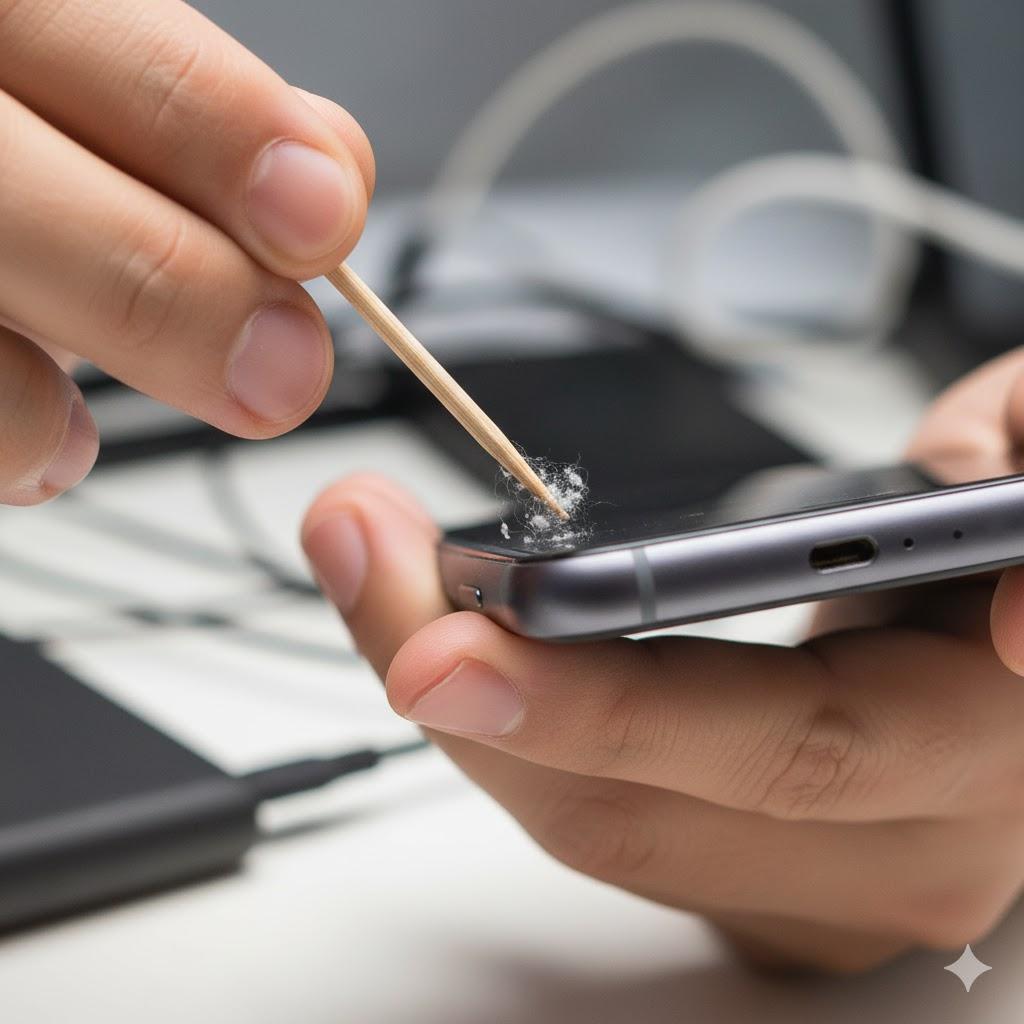
Over time, lint and dirt can build up in your phone’s charging port and block the connection.
How to clean it safely:
Turn off your phone.
Shine a flashlight into the port.
Gently use a toothpick or a soft brush to remove debris (never metal pins).
Plug in again and see if it clicks snugly.
You’d be amazed how often this simple step fixes the issue!
4. Try a Different Charger or Cable
Summary: Rule out the accessories.
If cleaning didn’t help, borrow a friend’s charger or cable. If it charges fine with theirs, your old charger may be the culprit.
If it still doesn’t charge, move to another outlet or USB port—sometimes it’s the wall adapter that’s gone bad.
5. Restart or Reset Your Phone
Summary: Sometimes the software needs a quick “wake-up.”
iPhone: Hold the power button → slide to turn off → wait 30 seconds → turn on.
Android: Hold the power button → tap Restart.
If the battery was fully drained, leave it plugged in for 10–15 minutes before trying to power it on.
6. Check for Software Updates
Summary: Updates fix hidden bugs that affect charging.
On iPhone: Settings → General → Software Update.
On Android: Settings → System → Software Update.
If one’s available, install it while plugged in. Then restart the phone and try charging again.
“Need a hand? Your friends at FriendlyHelp are just a click away—book your appointment today!
7. Avoid Heat and Overuse
Summary: Heat is the enemy of batteries.
Don’t charge your phone under a pillow, in direct sunlight, or while streaming videos. Heat can make the charger stop temporarily to protect the battery.
If it feels hot, unplug it and let it cool before trying again.
8. When to Call for Help
Summary: Sometimes it’s beyond DIY.
If your phone:
Still doesn’t charge with multiple cables, or
Stops charging halfway every time,
It could be a battery or charging port issue that needs a professional.
You can schedule repairs at:

FAQ: Fixing a Phone That Won’t Charge
Q1: Can I use any charger brand?
It’s safer to use the one that came with your phone or an official brand-certified cable.
Q2: My phone only charges at certain angles—why?
That’s usually a loose or dirty charging port. Clean it gently or have it checked.
Q3: Is wireless charging safer?
Yes, if your phone supports it! It skips the port entirely.
The 5 Golden Rules to Keep Your Phone Charging Smoothly ⚡
Keep your cables clean and untangled.
Avoid cheap chargers.
Check the port regularly for dust.
Restart your phone weekly.
Don’t panic—most charging issues are easy fixes!
Most charging problems aren’t serious—they’re usually about the connection, not the phone itself.
A worn cable, dusty port, or simple restart often solves the issue faster than expected. Taking a few calm steps can save time, stress, and unnecessary repairs. And if your phone still won’t cooperate or you’d rather have someone walk through it with you, FriendlyHelp is here to help you get powered up again safely and confidently—no frustration required.
